
Dismissals
Finish tasks with a simple tap, a QR code scan, or a proof picture.
 Pestly
Do what you set out to do

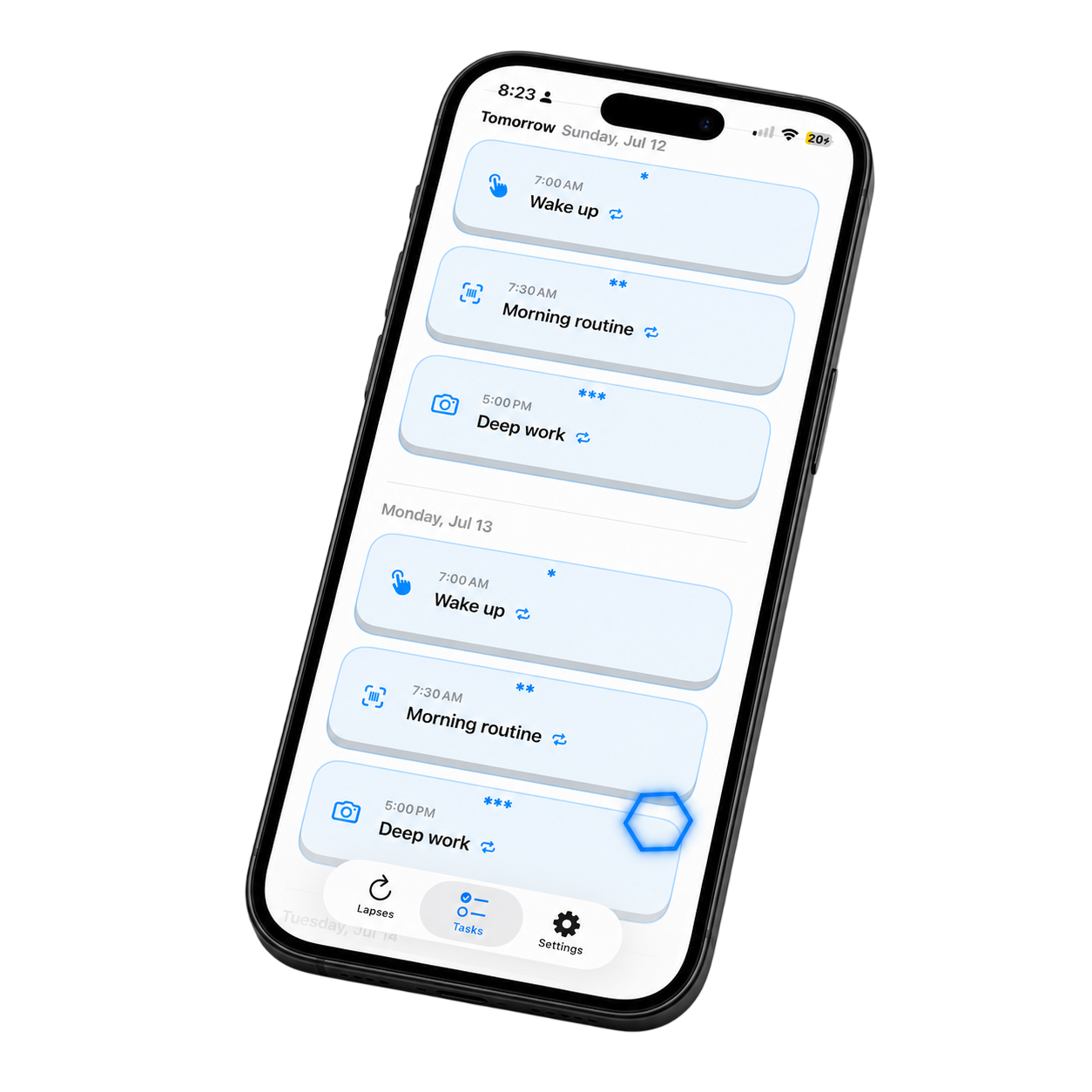
Finish tasks with a simple tap, a QR code scan, or a proof picture.
Use notifications and alarms to keep important tasks visible.
Shield distracting apps during the task window.
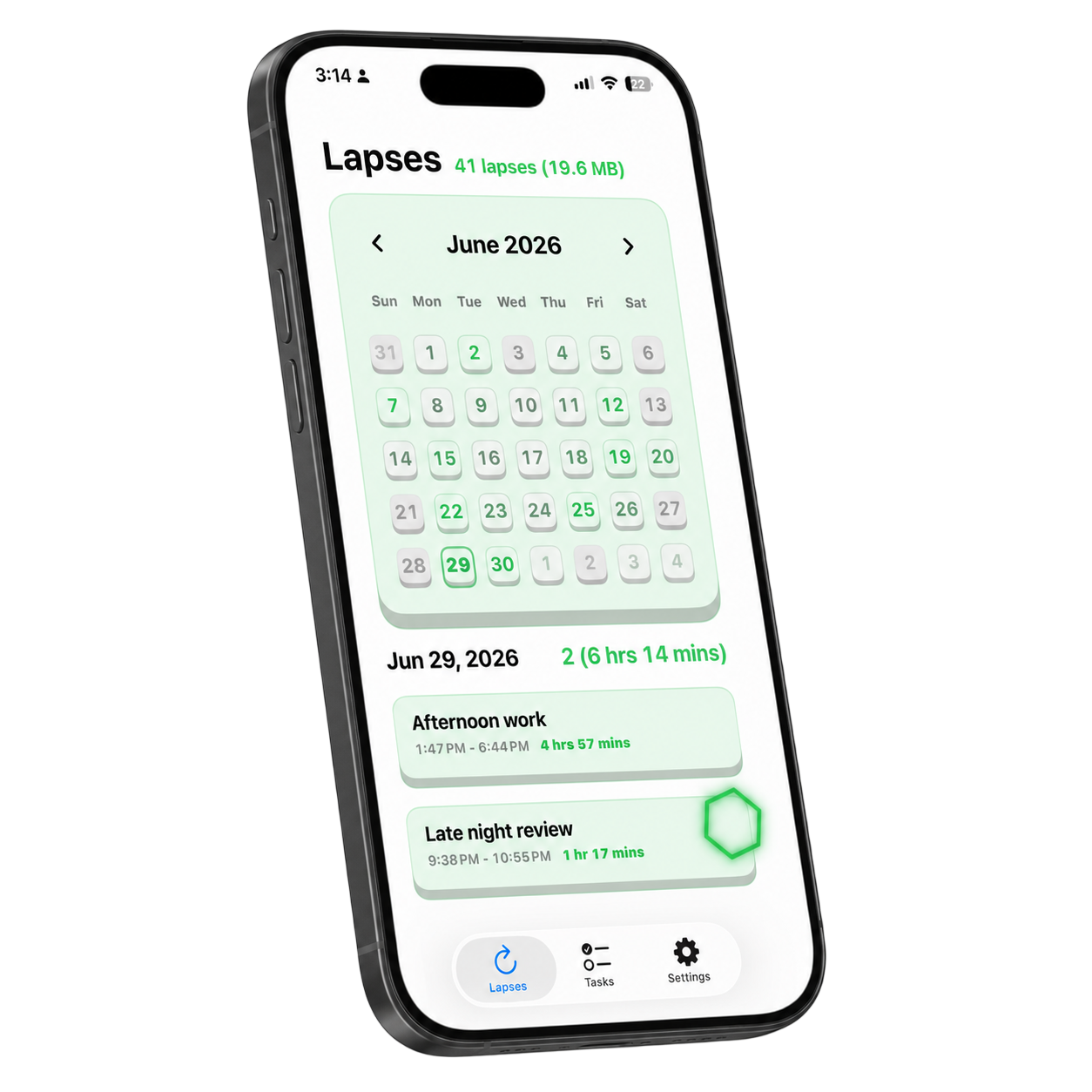
Record yourself working to mimic a feeling of being watched, keeping yourself on task while tracking progress.
If you have any questions, feedbacks, recommendations, or more, feel free to reach out to us!


We will try to respond to you as soon as possible
Pestly is an iPhone accountability app for tasks that are easy to postpone. You create a task, choose how persistent the reminder should be, and optionally require proof before marking it done.
Pestly supports a simple tap-to-finish mode, QR or barcode scanning, and Photo mode. QR mode compares the scanned payload against a saved reference. Photo mode checks whether a captured image reasonably matches the description you wrote.
When you set up the task, you scan or enter the reference code. When the reminder is active, Pestly asks you to scan that same code again before the task can be completed.
You describe what the proof photo should show, then take a picture when the task is active. Pestly sends the image and your description to Google's Gemini API for an automated match decision.
No. Photo mode is intended to check whether a scene broadly matches a task description. It is not facial recognition, identity verification, security authentication, or professional judgment.
Screen Time blocks use Apple's Family Controls and Managed Settings permissions. You choose apps, categories, or web domains to shield during a task window so distractions are harder to open while the reminder is active.
Timelapse capture lets you record a local timelapse for tasks where seeing progress helps. The saved timelapse stays on your iPhone until you delete it or remove the app.
Templates and favorites make repeated routines faster to create. They can preserve task titles, timing, proof modes, reminder choices, Screen Time settings, and timelapse preferences.
Most app features are local. Photo mode needs a network connection because it uses Google's Gemini API for validation. App Store purchases and restore flows also depend on Apple services.
Depending on the features you use, Pestly may ask for camera access, notifications, alarms, and Screen Time / Family Controls authorization.
Most task data is stored locally on your iPhone. Photo mode sends the captured image and task description to Google's Gemini API. See the Privacy Policy for the full breakdown.
Paid app features may be offered through Apple's App Store. Pricing, renewal, cancellation, and redemption details will be shown before purchase.
Effective date: July 2, 2026
Last updated: July 2, 2026
These Terms of Service ("Terms") are a binding agreement between you and Pestly ("Pestly," "we," "us," or "our"). They govern your access to and use of the Pestly website, iPhone app, related features, content, and support (together, the "Services").
By accessing or using the Services, you agree to these Terms and our Privacy Policy. If you do not agree, do not use the Services.
You must be at least 18 years old and legally able to enter into a binding contract to use the Services. If you use the Services for an organization, you represent that you have authority to bind that organization, and "you" includes that organization.
The Services are currently intended for users in the United States. You are responsible for determining whether your use is lawful where you live.
Pestly is under active development. The website may describe planned, prototype, beta, or not-yet-available features, compatibility, subscriptions, or app behavior. Those descriptions are estimates, not guarantees. Features may be incomplete, changed, delayed, limited, or removed before release.
The website does not currently provide registration, website sign-in, website checkout, or a mailing-list form. If Pestly later adds website accounts, paid website purchases, or other collection flows, additional terms and privacy disclosures may apply.
Subject to these Terms, Pestly grants you a limited, personal, revocable, non-exclusive, non-transferable license to:
You receive a license to the software, not ownership of it. Pestly and its licensors retain all rights not expressly granted.
You are responsible for:
You may not:
Pestly is a productivity aid. It is not an emergency alert, life-safety system, medical treatment, mental-health treatment, safety-critical alarm, or substitute for professional advice or human supervision.
Reminders, alarms, notifications, Screen Time shields, QR checks, Photo-mode checks, timelapse capture, and local app storage can fail, be delayed, be inaccurate, or become unavailable because of iPhone state, permissions, battery level, connectivity, operating-system behavior, app termination, third-party outages, or software errors. Do not rely on Pestly for medication, caregiving, transportation, security, legal deadlines, workplace safety, or any situation where failure could cause injury, death, property damage, or substantial loss.
Avoid configuring reminders, alarms, Screen Time blocks, or persistence features in a way that creates a hazard or prevents another person from controlling their environment.
QR verification checks whether a scanned payload matches the reference saved in the app. It does not verify identity, ownership, location, safety, or task quality.
Photo verification sends the captured image and your task description to Google's Gemini API for an automated match decision. The result may be incorrect, inconsistent, or affected by framing, lighting, model behavior, connectivity, or third-party service changes. Photo verification is a convenience feature and is not facial recognition, identity verification, security authentication, evidence of presence, or professional judgment.
You retain ownership of content you submit. You grant Pestly a limited, worldwide, royalty-free license to process that content only as necessary to provide, secure, troubleshoot, and improve the Services and to meet legal obligations. You direct us to transmit Photo-mode content to Google for validation. Google's terms and privacy practices also apply to its processing. Do not submit content if you do not have the necessary rights and permissions.
The app may let you capture timelapse videos for tasks. You are responsible for choosing what appears in the frame and for respecting the privacy and rights of others. Do not record in places where recording is prohibited or where people reasonably expect privacy.
Screen Time shielding depends on Apple Family Controls and Managed Settings authorization. You choose the applications, categories, or web domains to shield and the duration. Apple may restrict, revoke, or change these capabilities. You can change permissions in iOS Settings, but doing so may stop related Pestly features.
You remain responsible for access needed for emergencies, work, education, accessibility, authentication, transportation, communication, and other essential uses. Do not configure shielding in a way that creates a safety risk or prevents access required by law or another agreement.
If Pestly offers subscriptions, paid Photo-mode access, redemption codes, or other purchases, the price, renewal period, cancellation method, taxes, and any additional terms will be disclosed before purchase.
Digital purchases offered in the iPhone app will be processed by Apple unless stated otherwise. Apple's payment, subscription, refund, and cancellation rules apply. Deleting the app does not automatically cancel an Apple subscription. Manage Apple subscriptions through your Apple account settings.
Promotional or redemption codes may have additional eligibility, expiration, territorial, and usage restrictions and may not be exchanged for cash except where required by law.
The Services rely on or link to services provided by Apple, Google, hosting providers, email providers, and potentially other vendors. Their separate terms and privacy policies apply to their services. We do not control third-party services and are not responsible for their availability, security, content, or independent conduct.
You must comply with applicable third-party terms, including Apple's Usage Rules and the terms that apply to any network, content, file, or service you use with Pestly.
The Services, including software, text, graphics, logos, visual material, and other content supplied by Pestly, are owned by Pestly or its licensors and are protected by intellectual-property laws.
If you send suggestions, ideas, or feedback, you grant us a perpetual, worldwide, irrevocable, royalty-free license to use and incorporate that feedback without restriction or compensation. This does not give us ownership of your personal information or user content.
We may update the app, change or discontinue features, impose reasonable usage limits, suspend access, or stop supporting older software. Some updates may be required for compatibility, security, or continued use.
You may stop using the Services at any time. You may delete the app. We may suspend or terminate your access if you materially or repeatedly violate these Terms, create risk or legal exposure, or misuse the Services. Sections that by their nature should survive termination will survive, including ownership, disclaimers, liability limits, dispute provisions, and licenses needed for prior processing.
TO THE MAXIMUM EXTENT PERMITTED BY LAW, THE SERVICES ARE PROVIDED "AS IS" AND "AS AVAILABLE." PESTLY DISCLAIMS ALL EXPRESS, IMPLIED, AND STATUTORY WARRANTIES, INCLUDING WARRANTIES OF MERCHANTABILITY, FITNESS FOR A PARTICULAR PURPOSE, TITLE, NON-INFRINGEMENT, ACCURACY, QUIET ENJOYMENT, AND THAT THE SERVICES WILL BE UNINTERRUPTED, SECURE, ERROR-FREE, OR ACHIEVE A PARTICULAR PRODUCTIVITY RESULT.
Nothing in these Terms excludes a warranty or consumer right that cannot lawfully be excluded.
TO THE MAXIMUM EXTENT PERMITTED BY LAW, PESTLY AND ITS OWNERS, AFFILIATES, LICENSORS, SERVICE PROVIDERS, EMPLOYEES, AND AGENTS WILL NOT BE LIABLE FOR INDIRECT, INCIDENTAL, SPECIAL, CONSEQUENTIAL, EXEMPLARY, OR PUNITIVE DAMAGES; LOSS OF PROFITS, REVENUE, DATA, USE, GOODWILL, OR OPPORTUNITY; OR PERSONAL OR PROPERTY LOSS ARISING FROM OR RELATED TO THE SERVICES, EVEN IF ADVISED OF THE POSSIBILITY.
TO THE MAXIMUM EXTENT PERMITTED BY LAW, PESTLY'S TOTAL LIABILITY FOR ALL CLAIMS ARISING OUT OF OR RELATING TO THE SERVICES WILL NOT EXCEED THE GREATER OF (A) THE AMOUNT YOU PAID PESTLY FOR THE SERVICE GIVING RISE TO THE CLAIM DURING THE 12 MONTHS BEFORE THE EVENT OR (B) US$100.
These limits do not apply where prohibited by law, including liability that cannot be limited for fraud, willful misconduct, gross negligence, or certain personal injuries. Some jurisdictions do not allow certain exclusions, so some terms may not apply to you.
To the extent permitted by law, you will defend, indemnify, and hold harmless Pestly and its affiliates, personnel, and service providers from third-party claims, damages, losses, and reasonable costs arising from your unlawful misuse of the Services, your violation of these Terms, or content you submit in violation of another person's rights. This section does not require a consumer to indemnify Pestly for Pestly's own unlawful conduct.
These Terms are governed by the laws of the State of California and applicable United States federal law, without regard to conflict-of-law rules. Except where consumer law permits or requires another forum, the state and federal courts located in California will have exclusive jurisdiction, and you and Pestly consent to personal jurisdiction there.
Before filing a claim, you and Pestly agree to make a good-faith attempt to resolve the dispute informally by sending a written description of the issue and requested relief to app.pestly@gmail.com and allowing 30 days for a response. This requirement does not prevent either party from seeking urgent injunctive relief or using small-claims court where eligible.
If you obtain the app through Apple's App Store:
These Terms and the Privacy Policy are the entire agreement regarding the Services unless additional terms are presented for a specific purchase or feature. If a provision is unenforceable, it will be limited to the minimum extent necessary, and the remaining provisions will remain effective. Our failure to enforce a provision is not a waiver. You may not assign these Terms without our consent; we may assign them as part of a merger, reorganization, sale, or by operation of law. Headings are for convenience only.
We may update these Terms by posting a revised version and changing the date above. If a change is material, we will provide additional notice when reasonably practicable. Your continued use after the effective date of revised Terms constitutes acceptance, except where applicable law requires another form of consent.
Questions about these Terms may be sent to:
Pestly
Email: app.pestly@gmail.com
Effective date: July 2, 2026
Last updated: July 2, 2026
Pestly ("Pestly," "we," "us," or "our") provides the Pestly website, iPhone app, and related support services (together, the "Services"). This Privacy Policy explains what information is processed when you use the Services, how it is used, and the choices available to you.
This Policy applies to the Pestly website, the Pestly iPhone app, and communications with us. It does not govern third-party websites, platforms, APIs, app stores, or services that we do not control.
Pestly does not currently provide website registration, website sign-in, or website checkout. If that changes, we will update this Policy before collecting new categories of information through those flows.
We do not currently use advertising SDKs, cross-site behavioral advertising, or a website analytics service in the reviewed website code.
Most Pestly app information remains on your iPhone and is not sent to Pestly. The app stores information needed to provide its features, including:
This local information is stored in the app's private container, UserDefaults, or the shared app group used by Pestly's Screen Time shield extension. Apple and iOS may process this information as needed for backups, notifications, alarms, Screen Time, file picking, and other platform features according to your Apple settings and Apple's terms.
Photo mode is not facial recognition and is not intended to identify a person. A photo or timelapse can nevertheless contain faces, documents, locations, or other personal information, so review the scene before capturing it.
Depending on the features you choose, the app may ask for:
Pestly accesses these resources only when needed for the feature you select. You can change system permissions in iOS Settings. Turning off a permission may disable the related feature.
We use information to:
Where applicable law requires a legal basis, we rely on performance of our contract with you, your consent, our legitimate interests in operating and securing the Services, and compliance with legal obligations. You may withdraw consent where consent is the basis, but withdrawal does not affect earlier lawful processing.
We may disclose information in the following circumstances:
We do not sell personal information. We do not share personal information for cross-context behavioral advertising or use it to serve targeted advertisements. We do not knowingly disclose personal information to data brokers.
Deleting the app does not automatically delete information already submitted to Google, Apple, an email provider, or us.
You may:
Depending on where you live, you may also have rights to data portability, restriction or objection to processing, withdrawal of consent, appeal of a denied request, or submission of a complaint to a privacy regulator. We will not discriminate against you for exercising a privacy right. We may need to verify a request before acting on it.
Because most app data is stored only on your iPhone, Pestly may not possess or be able to retrieve it. Requests to Google, Apple, or another independent provider may need to be directed to that provider.
Pestly and its providers may process information in the United States, the European Union, and other countries. Privacy laws in those places may differ from those where you live. Where required, we use legally recognized safeguards for international transfers.
We use reasonable administrative, technical, and organizational measures designed to protect information. No storage or transmission method is completely secure, and we cannot guarantee absolute security. Protect access to your iPhone, email account, imported files, QR references, and Photo-mode scenes. Do not use Photo mode or timelapse capture for highly sensitive or confidential material.
The Services are not directed to children and are intended only for people age 18 or older. We do not knowingly collect personal information from anyone under 18. If you believe a person under 18 has provided personal information to us, contact us so we can investigate and delete it as appropriate.
We may update this Policy as the Services or legal requirements change. We will post the revised Policy and update the date above. If a change materially affects how we use information already collected, we will provide additional notice or obtain consent when required.
For privacy questions or requests, email app.pestly@gmail.com with the subject line "Privacy Request."
Pestly
Email: app.pestly@gmail.com